While Starting the server use the following.
E:\Research\Softwares\jboss-5.1.0.GA\bin>run.bat -b 0.0.0.0
E:\Research\Softwares\jboss-5.1.0.GA\bin>run.bat -b 0.0.0.0
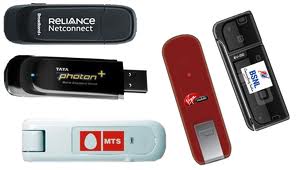 Here we have different Data Cards Available in Indian Market. Now almost every telephone Companies provides the Data cards. Such as BSNL, Reliance, MTS , TATA Photon. Every one provides 3G Service too. But the cost of very less speed internet data card cost 1500-1700 initial cost and 40-500 per month for 500MB to 2 GB Data, isnt costing very high on this Internet world.On discussion with other friends abroad, i came to know the 3G Modem, which is available in Indian Market too, But India have it , but integrated with any mobile operators SIM Card/ Data Card.Now lets come to the point, I did some adjustment with one Internet 3G Modem, I am able to browse on a wonderful speed provides better clarity on Voice chatting.How to make a Data Card costing IRS 50-60 and having Browsing limit to 2-3GB per month [Monthly Expense for Portable Device is IRS:50-65], is it Interesting to you.How I achieved it is I got a 3G Modem from one of My friend, I bought one TATA DOCOMO SIM Card for RS 70 (A good talk time with it.), Re Charged with IRS:65 for 2.5 GB GPRS.If you want to buy 3G Modem, it cost 900-1200 in Indian Market, you can get it in
  The application GUI will looks same as this, may be different in colours, Because i saw in Idea Data Card, which have the same GUI with IDEA Yellow colour instead of this light blue screen :) :
 Step 2: Open the Tools--> Options, here you will get the following screen. Do the settings as given in image.
 Step 3:In the Text Message Screen you dont need to do any Changes, let it got with default settings.
 Step 4:In the Screen of Profile Management we have the settings for the GPRS/Internet. You can get these settings from customer cares as well.Step 5: The Network settings to be done as given in Image "Screen Networ 1" and "Screen Networ 2"
 |
| Screen Netwrok 1 |
 |
| Screen Network 2. |

package com;

import java.io.IOException;

public class LockMachine {
 public static void main(String[] args) {
  String WINDOWS_LOCK_COMMAND="rundll32.exe user32.dll, LockWorkStation";
  Runtime rt = Runtime.getRuntime();

  try {
   rt.exec(WINDOWS_LOCK_COMMAND);

  } catch (IOException e1) {
   e1.printStackTrace();
  }
 }
}
 |
| Salary Restructure means confusing Employees, Only one question left with me "Abey saala mujko kya deraha hai ?" |
public class XMLData {
 private int id;
 private String xml;

 public int getId() {
  return id;
 }

 public void setId(int id) {
  this.id = id;
 }

 public String getXml() {
  return xml;
 }

 public void setXml(String xml) {
  this.xml = xml;
 }
}
I got the following Exception.Exception in thread "main" org.hibernate.exception.GenericJDBCException: could not insert: [org.cgi.model.Server] at org.hibernate.exception.SQLStateConverter.handledNonSpecificException(SQLStateConverter.java:103) at org.hibernate.exception.SQLStateConverter.convert(SQLStateConverter.java:91) at org.hibernate.exception.JDBCExceptionHelper.convert(JDBCExceptionHelper.java:43) at org.hibernate.id.insert.AbstractReturningDelegate.performInsert(AbstractReturningDelegate.java:40) at org.hibernate.persister.entity.AbstractEntityPersister.insert(AbstractEntityPersister.java:2093) at org.hibernate.persister.entity.AbstractEntityPersister.insert(AbstractEntityPersister.java:2573) at org.hibernate.action.EntityIdentityInsertAction.execute(EntityIdentityInsertAction.java:47) at org.hibernate.engine.ActionQueue.execute(ActionQueue.java:248) at org.hibernate.event.def.AbstractSaveEventListener.performSaveOrReplicate(AbstractSaveEventListener.java:290) at org.hibernate.event.def.AbstractSaveEventListener.performSave(AbstractSaveEventListener.java:180) at org.hibernate.event.def.AbstractSaveEventListener.saveWithGeneratedId(AbstractSaveEventListener.java:108) at org.hibernate.event.def.DefaultPersistEventListener.entityIsTransient(DefaultPersistEventListener.java:131) at org.hibernate.event.def.DefaultPersistEventListener.onPersist(DefaultPersistEventListener.java:87) at org.hibernate.event.def.DefaultPersistEventListener.onPersist(DefaultPersistEventListener.java:38) at org.hibernate.impl.SessionImpl.firePersist(SessionImpl.java:618) at org.hibernate.impl.SessionImpl.persist(SessionImpl.java:592) at org.hibernate.impl.SessionImpl.persist(SessionImpl.java:596) at sun.reflect.NativeMethodAccessorImpl.invoke0(Native Method) at sun.reflect.NativeMethodAccessorImpl.invoke(NativeMethodAccessorImpl.java:39) at sun.reflect.DelegatingMethodAccessorImpl.invoke(DelegatingMethodAccessorImpl.java:25) at java.lang.reflect.Method.invoke(Method.java:597) at org.hibernate.context.ThreadLocalSessionContext$TransactionProtectionWrapper.invoke(ThreadLocalSessionContext.java:301) at $Proxy0.persist(Unknown Source) at org.cgi.dao.manager.ServerDAO.persist(ServerDAO.java:44) at org.cgi.dao.manager.test.TestManager.main(TestManager.java:23) Caused by: com.mysql.jdbc.PacketTooBigException: Packet for query is too large (1094608 > 177152). You can change this value on the server by setting the max_allowed_packet' variable. at com.mysql.jdbc.MysqlIO.send(MysqlIO.java:3285) at com.mysql.jdbc.MysqlIO.sendCommand(MysqlIO.java:1970) at com.mysql.jdbc.MysqlIO.sqlQueryDirect(MysqlIO.java:2150) at com.mysql.jdbc.ConnectionImpl.execSQL(ConnectionImpl.java:2626) at com.mysql.jdbc.PreparedStatement.executeInternal(PreparedStatement.java:2119) at com.mysql.jdbc.PreparedStatement.executeUpdate(PreparedStatement.java:2415) at com.mysql.jdbc.PreparedStatement.executeUpdate(PreparedStatement.java:2333) at com.mysql.jdbc.PreparedStatement.executeUpdate(PreparedStatement.java:2318) at org.hibernate.id.IdentityGenerator$GetGeneratedKeysDelegate.executeAndExtract(IdentityGenerator.java:73) at org.hibernate.id.insert.AbstractReturningDelegate.performInsert(AbstractReturningDelegate.java:33) ... 21 more

Manifest-Version: 1.0
  Main-Class: com.example.Example
  Class-Path: dependent.jar
Classpath will be required in case you have more dependent jars are there, also we create the Same jar using the JAR Command provided by Java as follows.
jar cvfm myFile.jar myManifestFile *.class
I found that some of the executable jars will through ClassNotFound Exception.Hence i recommend to follow the Eclipse Jar Export Option.
The test Project i am going through have a Sample Java file to open a Window using the Java Swing. Once I execute the project the Output is as Follows.
 Now lets Create the JAR to run the Application.Step 1: Right Click on the Project and Select Export.
 Step 2: Select teh Export Destination as Runnable JAR File, and click Next.
 Step 3: Select the Class with main method, which need to be executed initially and teh Destination Folder where the Jar need to be saved. Here i selected "C:\test.jar"
 Step 4: Click Finish, Now your Executable Jar is ready @ C:\test.jar.
Hope you enjoyed the work through.
Step 4: Click Finish, Now your Executable Jar is ready @ C:\test.jar.
Hope you enjoyed the work through.